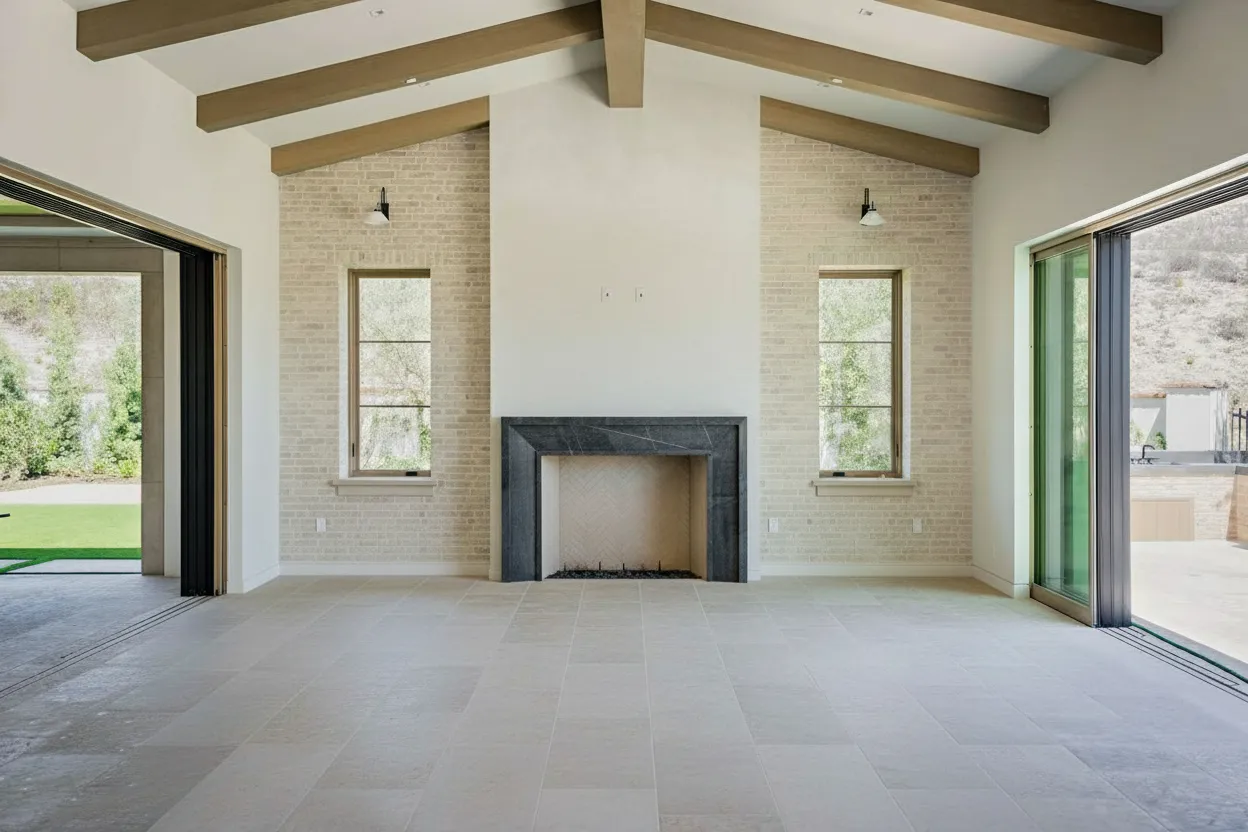
Selling a home is about selling a vision. But when a buyer looks at a photo of an empty room, what vision do they see? Often, not much. They see cold, vacant space and struggle to imagine their own life unfolding there. This is the exact problem that virtual staging software was created to solve.
Simply put, virtual staging software is a powerful digital tool that lets you place beautiful, realistic furniture and decor into photos of empty properties. It’s like having a professional interior designer on-demand, ready to transform a blank canvas into a warm, inviting home that buyers can emotionally connect with.
From Empty Rooms to Dream Homes
Let’s be honest: selling the potential of four empty walls is tough. Most people aren’t designers, and they have a hard time visualizing how their own furniture will fit, let alone what a room could be. Those echoey, lifeless listing photos can make a property feel sterile and unappealing.
Virtual staging software bridges that critical imagination gap. Instead of asking buyers to “picture it,” you can show them exactly what’s possible, turning a confusing layout into a functional and beautiful living space.
Why The First Showing is Now Online
In real estate today, the first impression isn’t made at the front door; it’s made on a laptop or a smartphone. Your online listing is the new curb appeal, and in that crowded digital space, you have seconds to grab a buyer’s attention. High-quality, compelling visuals are no longer a nice-to-have—they’re essential.
- Builds an Emotional Connection: A well-staged photo feels like a home, not just a house. It helps buyers form an immediate bond with the property.
- Defines the Space: Is that awkward nook a perfect spot for a home office, a cozy reading corner, or a playroom? Virtual staging answers that question instantly.
- Gives You a Competitive Edge: In a sea of similar listings, beautifully staged photos stop the scroll. They generate more clicks, more engagement, and ultimately, more qualified leads.
The industry has taken notice. What was once a niche tool is now a mainstream marketing strategy. The global market for virtual staging was valued at over $230 million and is on track to hit a staggering $1.2 billion by 2030. This isn’t just a fleeting trend; it’s a fundamental shift in how properties are marketed.
Virtual staging software turns lifeless photos into aspirational living spaces. It’s no longer a luxury for high-end listings but a core component of any effective property marketing plan.
The difference it can make is truly night and day. A quick look at a virtual staging before and after gallery shows just how dramatic the transformation can be. It’s one of the easiest and most cost-effective ways to make an empty listing irresistible, drive more showings, and get to the closing table faster.
Traditional Staging vs Virtual Staging at a Glance
So, how does virtual staging stack up against the old-school method of physically moving furniture into a home? Here’s a quick rundown.
| Factor | Traditional Physical Staging | Real Estate Virtual Staging Software |
|---|---|---|
| Cost | High ($500 - $2,500+ per month) | Low (Often under $50 per image) |
| Time | Days to weeks for setup and removal | Hours to a couple of days |
| Flexibility | Limited; one style per room | Unlimited; change styles and furniture instantly |
| Logistics | Complex; requires movers, inventory, and access | Simple; just need high-quality photos |
| ROI | Good, but with significant upfront investment | Excellent, with minimal cost and high impact |
While physical staging will always have its place, the advantages of virtual staging—especially in terms of cost, speed, and flexibility—are impossible to ignore. You’re not just selling a property; you’re selling a dream. This proactive approach helps you present a polished, finished vision that today’s buyers expect.
How Does Virtual Staging Software Actually Work?
So, what’s really going on behind the scenes with real estate virtual staging software? It’s a fascinating blend of digital interior design wizardry and some seriously smart tech. On the surface, it’s about adding digital furniture to photos of empty rooms. But today’s platforms are much more sophisticated than just a fancy photo editor.
Imagine having access to a bottomless warehouse of designer furniture, art, and decor. That’s essentially what the software’s style library is—an endless digital catalog where everything is perfectly curated and ready to go, minus the headaches of moving a single physical box.
The real trick, though, isn’t just having the furniture; it’s making it look like it was always there. It’s not about plopping a sofa into a picture. It’s about making that sofa look like it truly belongs in that room.
This is where the powerful algorithms and artificial intelligence step in. The software acts like a highly skilled team of interior designers and professional photographers, all working together in perfect sync.
This diagram breaks down how the software transforms an empty space into something a buyer can fall in love with.

As you can see, the software is the bridge connecting a property’s raw potential to a buyer’s emotional connection.
From Pixels To Photorealism
Getting a result that feels real—so real you could almost touch it—comes down to the software’s ability to understand and mimic the physics of light and space within a simple 2D photo. This isn’t just basic image editing; it’s a multi-step process.
First, the software has to understand the room itself. It maps out the walls, floors, and ceilings to get a feel for the space’s dimensions and perspective. This is what prevents a digitally added couch from looking comically small or sitting at a gravity-defying angle.
But then comes the hardest part: light.
The software essentially becomes a digital lighting guru. It has to meticulously analyze the light that’s already in the photo—where it’s coming from, its color, and how soft or harsh it is. Only then can it cast realistic shadows and reflections for every piece of virtual furniture.
Skip this step, and the illusion is shattered. Objects look like they’re floating, and the image just feels off. A badly rendered shadow is a dead giveaway that the image has been edited, which can instantly make a potential buyer skeptical.
The AI-Powered Design Process
The latest virtual staging platforms have automated this entire workflow, turning around stunningly realistic images in minutes, not hours. Here’s a quick look at how it typically works:
- Image Analysis: The AI scans your photo, instantly mapping the room’s layout, perspective, and existing light.
- Style Selection: You pick a design vibe from a library—think “Modern Farmhouse,” “Scandinavian,” or “Industrial Loft.” This gives the AI its creative direction.
- Intelligent Placement: The algorithm then gets to work, choosing furniture from its digital catalog and arranging it in a way that makes sense. It knows a dining table goes in the dining room and a bed belongs in the bedroom.
- Realistic Rendering: Finally, the software renders the finished scene. It generates all the necessary shadows, highlights, and reflections, seamlessly blending the new virtual items into the original photo.
And that’s the fundamental difference. This isn’t just about tweaking a photo. It’s about using technology to sell a vision—to showcase a property’s true potential and help buyers see a house as their future home.
The Essential Features That Drive Results

When you hear real estate virtual staging software, you probably think of adding a digital sofa to an empty room. And you’re right, that’s part of it. But the best platforms today are so much more than that. They’re a complete visual marketing toolkit, loaded with features that solve the real-world problems agents and photographers face every single day.
These tools work together to transform standard, and sometimes problematic, listing photos into visuals that stop buyers in their tracks. It all starts with that core staging function, but modern software has evolved to tackle nearly every aspect of a property’s visual appeal. Let’s break down the capabilities that really move the needle.
AI-Powered Virtual Staging
This is the main event. It’s the magic of taking an empty room and furnishing it with photorealistic furniture and decor. Thanks to AI, this process is now incredibly fast and surprisingly intelligent. Instead of painstakingly placing every single chair and lamp, the AI can analyze a room’s dimensions, lighting, and perspective to suggest or even automatically place furniture that fits the space perfectly.
Think of it as having a super-fast interior designer on call. This feature is absolutely critical for helping buyers see a house as a home. It bridges that “visualization gap” so they aren’t just looking at a cold, empty box, but a beautiful, functional living space they can imagine themselves in.
Virtual Decluttering and Item Removal
Let’s be honest: most homes for sale aren’t pristine, empty canvases. They’re lived-in, and that often means personal belongings, dated furniture, or just general clutter. This can be a huge distraction for buyers. Virtual decluttering is the answer—it uses AI to digitally identify and erase unwanted objects from a photo, giving you a clean slate to work with.
This isn’t just about tidying up. It’s about depersonalizing the space so a buyer can project their own life and style onto the home, instead of getting caught up in the seller’s taste.
This feature is a lifesaver when dealing with occupied properties. It means the seller doesn’t have to physically haul out heavy furniture or pack up all their family photos just for a photoshoot. It saves everyone time, effort, and a lot of potential headaches. Once a room is decluttered, it’s ready for its virtual staging close-up.
Day to Dusk and Lighting Enhancements
Nothing kills the vibe of a listing photo faster than bad lighting. A home shot on a gray, overcast day just doesn’t pop. It lacks the emotional pull of a property bathed in the warm glow of a beautiful sunset.
Day-to-dusk conversion is a game-changer here. It’s a feature that digitally transforms a standard daytime exterior shot into a stunning twilight photo. These “hero shots” have a premium, high-end feel that makes a listing stand out, grabbing immediate attention on the MLS or social media.
The same principle applies indoors. Lighting enhancements can brighten up dark corners, fix weird color casts from lightbulbs, and create a warm, inviting feel throughout the entire home. These tweaks ensure every room looks its absolute best, no matter what the weather was doing on photo day.
Why These Features Work Together
Each of these tools is powerful on its own. But when you use them together, you get a seamless workflow that produces truly exceptional marketing materials. You can take a photo of a cluttered, dimly lit room, use AI to declutter it, virtually stage it with beautiful furniture, and then enhance the lighting to make it shine.
This combined power is why virtual staging has become such a potent sales tool. A landmark survey found that over 70% of U.S. realtors now use virtual staging. Why? Because more than 75% of them say it helps sell homes faster and for more money. These trends are fueling incredible growth, with the Virtual Staging Solution Market expected to grow from $574.35 million to a massive $4,730.46 million. You can dig into the numbers and see how these tools are reshaping the industry by checking out the full market growth analysis.
By using this full suite of features, you’re no longer just documenting a property—you’re crafting its story. You’re creating an emotional connection with buyers before they even set foot inside. This is how modern real estate virtual staging software turns clicks into showings and showings into offers.
Choosing Your Virtual Staging Software Partner
Picking the right virtual staging software is a big decision, one that can genuinely make or break your marketing efforts. Think of it less like buying a tool and more like bringing on a new business partner. The right one will help you sell homes faster and for more money. The wrong one? Well, that just leads to headaches, missed deadlines, and results that fall flat.
This isn’t a time to shop on price alone or get wooed by a slick website. You’ve got to look under the hood and see what each platform is really made of. The goal is to find a provider that nails the sweet spot between powerful features, reliable performance, and a business model that works for you.
Evaluating Image Quality and Realism
Let’s start with the most important thing: the final image. Does it look real? Because if it doesn’t, you’ve wasted your time and money. Photorealism is the absolute baseline. If a buyer scrolls through your photos and their first thought is, “that looks fake,” you’ve lost their trust.
An unconvincing virtual staging job is worse than no staging at all. It screams “fake” and can make buyers question the integrity of the entire listing.
When you’re checking out a potential vendor, be a critic. Dive into their portfolio and zoom in on the details. Are the shadows cast correctly from the windows? Does that sofa look like it actually fits in the room, or is it comically large? The best real estate virtual staging software gets these little things right, creating images that feel so authentic you could imagine walking right into them.
Speed and Turnaround Time
We all know the mantra in real estate: time is money. A listing needs to go live now, not next week. The speed at which you can get your virtually staged photos back is a huge factor in which partner you choose. The old-school method often meant waiting 24 to 48 hours, a delay that can feel like an eternity when a seller is anxious to list.
This is where modern AI platforms have completely changed the game. Many can now generate beautiful, high-resolution staged photos in just a few minutes, sometimes even seconds. That kind of speed is a massive advantage. It means you can go from the property photoshoot to launching a full-blown marketing campaign on the very same day. Think about your own workflow—can you afford to wait, or do you need the instant results AI can provide?
Depth and Variety of Style Libraries
Your software should be like having a top-tier interior designer on call, complete with a bottomless inventory of furniture. A vast and varied style library is critical for creating a look that not only complements the home’s architecture but also speaks directly to your target buyer. One-size-fits-all staging just doesn’t cut it anymore.
A great platform will give you a full palette of styles to work with. For example:
- Modern Farmhouse: Instantly creates a warm, inviting feel that’s perfect for family homes.
- Scandinavian: Its clean lines and bright, airy feel are a huge draw for younger, minimalist buyers.
- Industrial Loft: The go-to choice for urban condos and unique converted spaces.
- Luxury Contemporary: Absolutely essential for high-end listings where sophistication is key.
The magic of virtual staging lies in this ability to customize the vision for each unique property. A robust style library, like the one you can explore in Bright-shot’s virtual staging features, gives you the creative freedom to stage any home perfectly.
Ease of Use and Customization
The most powerful tool in the world is useless if it’s too complicated to use. The software you choose should feel intuitive and fit right into your daily routine without a steep learning curve. Whether it’s an AI that does the heavy lifting with a single click or a simple drag-and-drop editor, it needs to be straightforward.
But simplicity shouldn’t mean a lack of control. While AI-driven speed is fantastic, you’ll inevitably want to make your own adjustments. Can you easily swap out that armchair for a different one? Can you nudge a coffee table a few inches to the left or change the color of the pillows? The best platforms give you both: the efficiency of automation and the granular control to fine-tune the final image until it’s just right.
Seeing the Return: Real-World Use Cases
Alright, let’s get down to what really matters: how does virtual staging software actually make you money? It’s easy to talk about features, but the real value becomes clear when we see how it solves everyday problems and opens up new doors for your business.
This isn’t just about making properties look pretty; it’s a strategic move that directly impacts your bottom line. We’ll walk through four common scenarios that show exactly how this technology translates into a tangible return on investment.
Use Case 1: The Solo Agent and the Empty Condo
Imagine a solo agent who specializes in city condos. A lot of her listings are empty, and potential buyers just can’t visualize how their life would fit into those blank, white boxes. It’s a classic problem.
She starts using virtual staging to turn these empty spaces into stylish, modern homes that appeal directly to her target buyers—young professionals. Suddenly, that awkward corner becomes a perfect home office, and that small living room looks just right with a sectional sofa.
- The Bottom Line: Her virtually staged condos start selling 40% faster than her unstaged ones. That’s a massive reduction in carrying costs. More importantly, it frees up her time and money to chase new listings, which is how she really grows her income.
Use Case 2: The Property Manager Fighting Vacancies
Now, let’s think about a property manager running a large apartment complex. Her main job is to keep units filled because every day a unit sits empty, money is lost. Showing vacant apartments is rarely inspiring and often slows down the leasing process.
So, she uses virtual staging to create beautifully furnished versions of each floor plan. These aren’t just for a single listing; they become the go-to marketing assets for the building’s website, social media, and rental portals, showcasing an aspirational, move-in-ready lifestyle.
By putting a polished, inviting vision online, she grabs the attention of high-quality tenants before they even think about scheduling a tour. It’s proactive marketing that fills units faster and keeps the rental income flowing.
- The Bottom Line: The complex cuts its average vacancy rate by 15%. That translates to tens of thousands of dollars in added rental income each year. If you’re wondering how to budget for something like this, this virtual staging cost and pricing guide is a great place to start.
Use Case 3: The Photographer Adding a New Service
A real estate photographer is constantly looking for ways to be more valuable to her agent clients. She decides to offer virtual staging as a premium add-on to her photography packages. Because the software makes it quick and affordable for her to produce, the profit margin is fantastic.
Agents absolutely love it. They get their professional photos and expert staging all from one person they already know and trust. The photographer is no longer just a vendor; she’s become a vital part of their marketing team.
- The Bottom Line: She adds a whole new revenue stream, boosting her average invoice by 30%. This offering helps her stand out in a crowded market and builds stronger, more lucrative relationships with her best clients.
Use Case 4: The Developer Pre-Selling a New Build
Finally, picture a developer with a new community of single-family homes on the horizon. Construction is months away from being finished, but they need to start lining up buyers now. All they have are architectural plans.
Using advanced real estate virtual staging software, they transform those flat 2D floor plans into photorealistic, fully furnished homes. These stunning images become the centerpiece of a high-impact marketing campaign to kick off pre-sales.
- The Bottom Line: The developer pre-sells 60% of the entire community before the first model home is even built. This influx of early capital is huge—it de-risks the project, proves market demand, and builds powerful momentum. The initial investment in virtual staging pays for itself many, many times over.
These examples aren’t isolated incidents; they’re part of a much larger trend. In North America, where the market is most mature, over 70% of agents are using these tools. They report that 75% of staged homes sell above asking price. And while North America leads, the Asia Pacific region is catching up fast, proving this is a global shift in how property is marketed. You can find more details about these global market dynamics on datainsightsmarket.com.
Weaving Virtual Staging Into Your Workflow

Bringing new technology into your business can feel like a huge undertaking. But adding real estate virtual staging software to your process is surprisingly straightforward and pays off almost immediately. This isn’t about reinventing the wheel; it’s about adding one powerful step that takes your current marketing to a whole new level.
Think of it as a simple, four-step addition to your existing routine. It fits right between the property photoshoot and the moment you launch your marketing campaign. Let’s walk through how easy it is to get started.
Step 1: Capture High-Quality “Before” Photos
It all starts with the photo. Even the most incredible software can’t fix a blurry, dark, or poorly composed shot. For results that truly pop, you need to begin with high-resolution photos that are bright, clear, and taken from the best possible angles. Nothing beats professional real estate photography.
That said, today’s AI tools are smart enough to work wonders with photos from a modern smartphone. Just make sure the room is tidy, well-lit, and that you’re shooting from a corner to really show off the room’s depth and scale. The better the input, the better the output.
Step 2: Choose Your Target Interior Style
Now for the fun part—you get to be the designer. Instead of settling for generic furniture, the best virtual staging platforms let you select a style that will connect directly with your target buyer.
Is it a downtown loft that would appeal to a young professional? Try a “Modern” or “Industrial” style. A big suburban home perfect for a growing family? “Modern Farmhouse” or “Coastal” will create that warm, aspirational vibe.
This is all about storytelling. When you match the design to the likely buyer, you’re not just showing a furnished room. You’re helping them picture a life they want to live, which creates a much deeper emotional connection. For a more detailed guide on this, our virtual staging for realtors guide has some great pointers.
Step 3: Run the Staging and Make Your Final Tweaks
This is where the magic happens, and with modern AI platforms, it can take just a few seconds. You upload your photo, pick your preferred style, and the software instantly generates a beautifully staged image, complete with realistic furniture, decor, lighting, and shadows.
Once the AI has done the heavy lifting, you can jump in and act as the creative director. Maybe you want to swap out a painting or change the color of the accent pillows to better match the home’s character. The best tools give you this perfect blend of speed and control, letting you fine-tune the final look.
The most effective workflows combine AI’s incredible speed with a human expert’s creative touch. The software does 95% of the work in an instant, freeing you up to add those final flourishes that make it perfect.
Step 4: Deploy Your Images for Maximum Impact
With your stunning new visuals ready to go, it’s time to get them in front of buyers. Use these images strategically across all your marketing channels to grab as much attention as possible.
- MLS Listing: Your “hero shot” should be the very first photo. A beautifully staged living room or a dramatic day-to-dusk exterior will stop buyers from scrolling past.
- Social Media: Create engaging carousels that show the “before-and-after” transformation. This kind of content gets a ton of interaction.
- Email Campaigns: Blast a “Just Listed” announcement to your database, leading with your most impressive and aspirational new photos.
By following this simple process, you can consistently create powerful marketing materials that capture buyer interest, generate more showings, and ultimately, sell properties faster.
Frequently Asked Questions
Jumping into the world of real estate virtual staging software naturally comes with a few questions. From ethics and cost to the nitty-gritty technical details, getting clear answers is the best way to feel confident about using this powerful marketing tool. Let’s walk through the most common queries we hear from agents and photographers.
Is Virtual Staging Misleading to Buyers?
This is a great question, and one that every professional should ask. The short answer is no, as long as you’re completely transparent about it. Ethical virtual staging isn’t about deception; it’s about inspiration.
Think of it like an architect’s rendering for a home that hasn’t been built yet. You’re not hiding reality, you’re helping buyers see what’s possible and overcome the “visualization gap” that often happens with empty rooms.
The goal is to sell a vision, not to fake a reality. As long as you clearly label your images as “virtually staged,” you build trust while showing off a property’s full potential.
Most MLS boards have strict rules that require this disclosure. Stick to those guidelines, and you’re using the tool exactly as intended—responsibly and effectively.
How Much Does Real Estate Virtual Staging Software Cost?
Pricing can feel all over the map, with some services charging per photo and others offering subscriptions. But the most important thing to focus on isn’t the price tag itself, but the massive savings you get compared to old-school physical staging.
Staging a home with real furniture can easily run into thousands of dollars for the initial setup, not to mention ongoing monthly rental fees. Virtual staging, on the other hand, costs a tiny fraction of that. It’s a high-return investment that delivers a polished, professional look without the logistical nightmares and huge expense.
Can I Use Photos From My Phone?
While a professional DSLR camera will always give you the sharpest, most pristine source images, it’s not a deal-breaker anymore. The AI engines inside modern software have gotten remarkably good at working with photos from today’s high-quality smartphones.
If you are using your phone, a few simple tricks will make a huge difference. Make sure the room is bright and evenly lit, hold your phone as steady as possible, and shoot from a corner to best capture the room’s size and layout. A better starting photo always leads to a more realistic final image.
How Fast Can I Get My Staged Images?
This is where the industry has really changed. Not too long ago, you’d send your photos to a designer and wait. A typical turnaround was 24-48 hours while a human artist manually added the furniture.
But today’s AI-powered real estate virtual staging software has completely upended that timeline. Top-tier platforms can now produce beautiful, photorealistic results in just a few seconds. This incredible speed means you can get your listings live and in front of buyers faster than your competition.
Ready to turn your empty listings into buyer magnets in seconds? With BrightShot, you can use the power of AI to create stunning, virtually staged photos with just one click. Try BrightShot for free and see the difference it makes!